


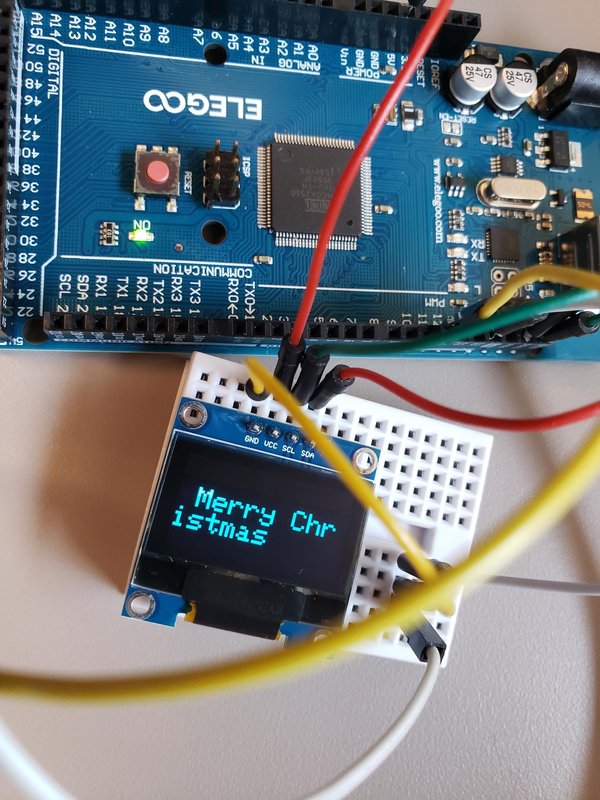
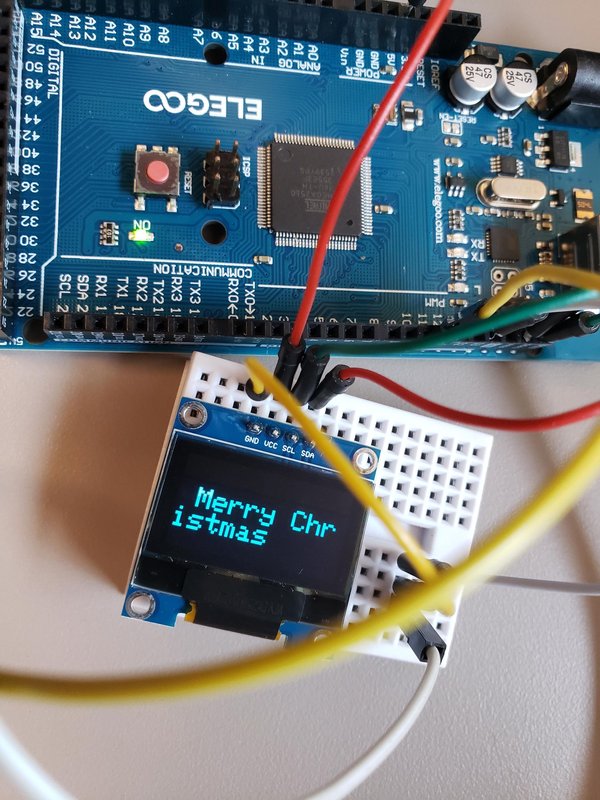
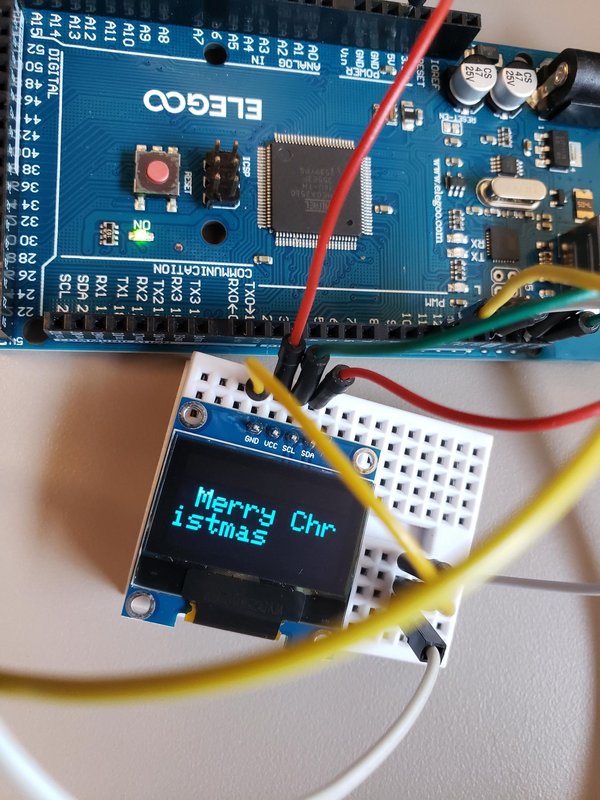
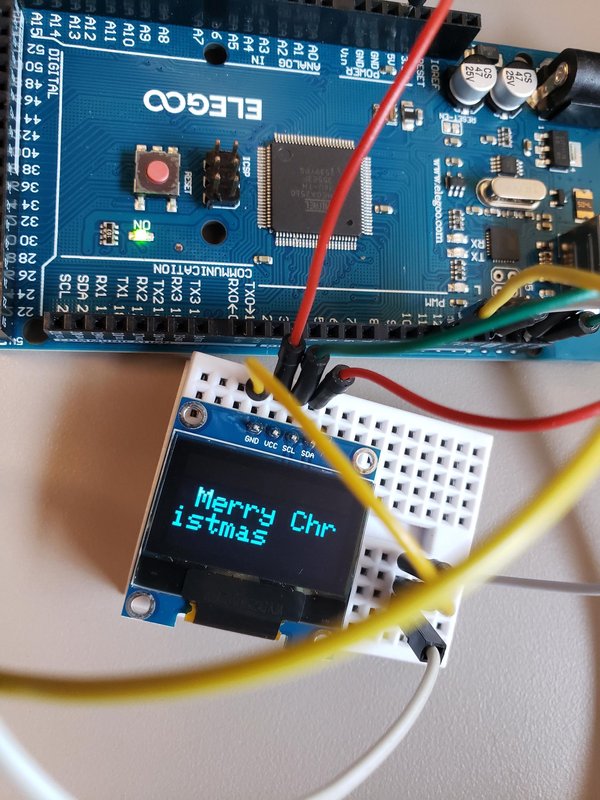
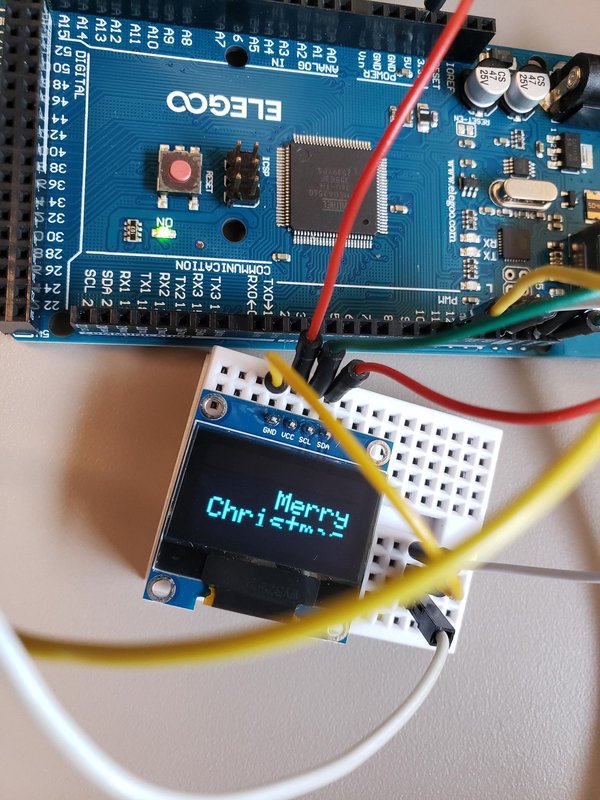
이 Instructables에서는 OLED와 피에조 소자를 활용해 아두이노로 크리스마스 노래를 재생하는 방법을 설명합니다.
사용한 도구;
Arduino 또는 동급 제품
USB 케이블
Arduino IDE가 설치된 컴퓨터
OLED
피에조
전선 또는 점퍼
코드
OLED 연결;
SDA를 Arduino의 SDA 또는 A4에 연결하세요.
SCL을 Arduino의 SCL 또는 A5에 연결하세요.
접지를 SDA 및 SCL 근처의 접지에 연결하세요.
VCC를 Arduino의 5볼트에 연결하세요.
피에조;
접지를 OLED와 동일한 접지에 연결하세요(브레드보드 참조).
피에조를 Arduino 11에 연결하세요(피에조의 양극 단자).
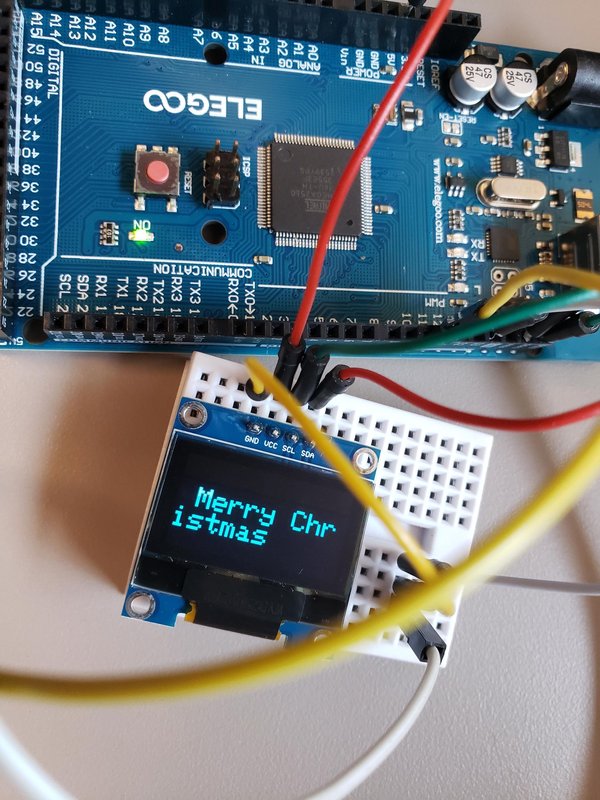
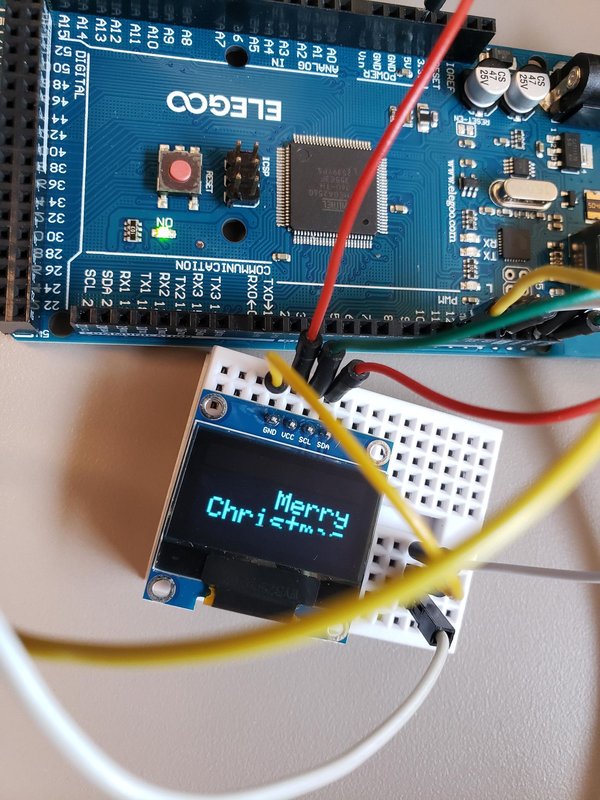
이 프로젝트는 Arduino, OLED 및 piezo로 구성되어 있습니다.
OLED는 Organic Light Emitting Diode(유기 발광 다이오드)를 의미합니다. 수백만 개의 픽셀이 자체적으로 빛을 내는 디스플레이입니다. TV, 휴대전화 및 디스플레이에 사용됩니다.
0.96인치 OLED는 작고 효율적인 디스플레이입니다. 128x64픽셀을 사용하며 백라이트가 필요하지 않습니다. 따라서 화질이 향상되고 전력 소비가 줄어듭니다.
다른 구성 요소인 piezo speaker는 두
개의 결정 사이에 piezo crystal이 있는 구조입니다. 결정 양단에 전압을 가하면 한 도체를 밀고 다른 도체를 당깁니다. 이러한 밀고 당기는 작용으로 소리가 납니다. (piezo 이미지 참조) (동영상 We wish you a Merry Christmas 참조)
Arduino가 코드를 읽고 곡의 음을 생성합니다. 곡은 piezo에서 들립니다.
다음은 곡이 담긴 짧은 동영상 몇 개입니다(전체 곡은 아닙니다. 동영상을 위한 공간이 제한되어 있기 때문입니다). 이 프로젝트에서는 모든 곡을 재생합니다.
https://vimeo.com/manage/videos/1225413465
https://vimeo.com/manage/videos/1225412795
Arduino용 코드는 다음과 같습니다;
#include <Wire.h>
#include <Adafruit_GFX.h>
#include <Adafruit_SSD1306.h>
#define SCREEN_WIDTH 128
#define SCREEN_HEIGHT 64
#define OLED_RESET -1
Adafruit_SSD1306 display(SCREEN_WIDTH, SCREEN_HEIGHT, &Wire, OLED_RESET);
#define speaker 11
// 일반적인 음악 용어에 따른 템포
#define grave 40
#define largo 46
#define lento 52
#define adagio 56
#define larghetto 60
#define adagietto 66
#define andante 72
#define andantino 80
#define maestroso 88
#define moderato 100
#define allegretto 104
#define animato 120
#define allegro 132
#define allegro_assai 144
#define vivace 160
#define presto 184
#define prestissimo 208
// 음의 주파수(Hz)
#define note_C4 262
#define note_CS4 277
#define note_D4 294
#define note_DS4 311
#define note_E4 330
#define note_F4 349
#define note_FS4 370
#define note_G4 392
#define note_GS4 415
#define note_A4 440
#define note_AS4 466
#define note_BF4 466
#define note_B4 494
#define note_C5 523
#define note_CS5 554
#define note_D5 587
#define note_DS5 622
#define note_E5 659
#define note_F5 698
#define note_FS5 740
#define note_G5 784
float default_tempo = float(animato);
float timings[7];
#define semib timings[0] // 4박
#define dot_minim timings[1] // 3박
#define minim timings[2] // 2박
#define crot timings[3] // 1박
#define quav timings[4] // 1/2박
String message = "Merry Christmas "; // 스크롤할 텍스트
int textX; // 스크롤을 위한 X 좌표
unsigned long lastDisplayUpdate = 0;
// 선행 선언
void set_tempo(float bpm);
void play(int note_freq, float duration_ms);
void rest(float duration_ms);
void updateDisplay();
void we_wish_you_a_merry_christmas();
void o_come_all_ye_faithful();
void away_in_a_manger();
void ding_dong_merrily();
void good_king_wenceslas();
void the_first_nowell();
void the_holly_and_the_ivy();
void we_three_kings();
void silent_night();
void setup() {
Serial.begin(9600);
pinMode(speaker, OUTPUT);
if(!display.begin(SSD1306_SWITCHCAPVCC, 0x3C)) {
Serial.println(F("SSD1306 allocation failed"));
for(;;);
}
display.clearDisplay();
display.setTextSize(2);
display.setTextColor(SSD1306_WHITE);
textX = SCREEN_WIDTH;
set_tempo(default_tempo);
}
void loop() {
we_wish_you_a_merry_christmas();
o_come_all_ye_faithful();
away_in_a_manger();
ding_dong_merrily();
good_king_wenceslas();
the_first_nowell();
the_holly_and_the_ivy();
we_three_kings();
silent_night();
}
// 곡의 박자 속도를 설정합니다
void set_tempo(float bpm) {
float crotchet_ms = (60.0 / bpm) * 1000.0;
timings[0] = crotchet_ms * 4.0;
timings[1] = crotchet_ms * 3.0;
timings[2] = crotchet_ms * 2.0;
timings[3] = crotchet_ms;
timings[4] = crotchet_ms / 2.0;
}
// 화면을 부드럽게 업데이트합니다(중단 없이 실행됨)
void updateDisplay() {
unsigned long currentMillis = millis();
if (currentMillis - lastDisplayUpdate >= 30) {
lastDisplayUpdate = currentMillis;
display.clearDisplay();
display.setCursor(textX, 20);
display.print(message);
display.display();
textX -= 1;
int textWidth = message.length() * 12;
if (textX < -textWidth) {
textX = SCREEN_WIDTH;
}
}
}
// 비차단형 음 재생기
void play(int note_freq, float duration_ms) {
unsigned long start = millis();
// 지속 시간의 90% 동안 음을 재생합니다
tone(speaker, note_freq);
while (millis() - start < (unsigned long)(duration_ms * 0.9)) {
updateDisplay(); // 음이 재생되는 동안 OLED 스크롤을 계속합니다!
}
noTone(speaker);
while (millis() - start < (unsigned long)duration_ms) {
updateDisplay(); // 음이 끝난 뒤의 간격 동안 OLED 스크롤을 계속합니다
}
}
void rest(float duration_ms) {
unsigned long start = millis();
while (millis() - start < (unsigned long)duration_ms) {
updateDisplay();
}
}
// --- 전체 곡 ---
void we_wish_you_a_merry_christmas() {
set_tempo(default_tempo);
for (uint8_t repeat = 1; repeat <= 2; repeat++) {
play(note_D4, crot); play(note_G4, crot); play(note_G4, quav); play(note_A4, quav);
play(note_G4, quav); play(note_FS4, quav); play(note_E4, crot); play(note_E4, crot);
play(note_E4, crot); play(note_A4, crot); play(note_A4, quav); play(note_B4, quav);
play(note_A4, quav); play(note_G4, quav); play(note_FS4, crot); play(note_D4, crot);
play(note_D4, crot); play(note_B4, crot); play(note_B4, quav); play(note_C5, quav);
play(note_B4, quav); play(note_A4, quav); play(note_G4, crot); play(note_E4, crot);
play(note_D4, quav); play(note_D4, quav); play(note_E4, crot); play(note_A4, crot);
play(note_FS4, crot); play(note_G4, minim); rest(crot);
}
}
void o_come_all_ye_faithful() {
set_tempo(default_tempo);
for (uint8_t repeat = 1; repeat <= 2; repeat++) {
play(note_G4, crot); play(note_G4, minim); play(note_D4, crot); play(note_G4, crot);
play(note_A4, minim); play(note_D4, minim); play(note_B4, crot); play(note_A4, crot);
play(note_B4, crot); play(note_C5, crot); play(note_B4, minim); play(note_A4, crot);
play(note_G4, crot); play(note_G4, minim); play(note_FS4, crot); play(note_E4, crot);
play(note_FS4, crot); play(note_G4, crot); play(note_A4, crot); play(note_B4, crot);
play(note_FS4, minim); play(note_E4, crot + quav); play(note_D4, quav); play(note_D4, dot_minim);
rest(crot);
}
}
void away_in_a_manger() {
set_tempo(moderato);
for (uint8_t repeat = 1; repeat <= 2; repeat++) {
play(note_C4, crot); play(note_F4, crot); play(note_F4, crot); play(note_G4, quav);
play(note_A4, quav); play(note_F4, crot); play(note_F4, crot); play(note_A4, quav);
play(note_BF4, quav); play(note_C5, crot); play(note_C5, crot); play(note_D5, crot);
play(note_BF4, minim); play(note_G4, quav); play(note_A4, quav); play(note_BF4, crot);
play(note_BF4, crot); play(note_C5, crot); play(note_A4, crot); play(note_A4, crot);
play(note_F4, quav); play(note_A4, quav); play(note_G4, crot); play(note_D4, crot);
play(note_E4, crot); play(note_F4, minim); rest(crot);
}
}
void ding_dong_merrily() {
set_tempo(default_tempo);
for (uint8_t repeat = 1; repeat <= 2; repeat++) {
play(note_G4, crot); play(note_G4, crot); play(note_A4, quav); play(note_G4, quav);
play(note_FS4, quav); play(note_E4, quav); play(note_D4, minim); rest(crot);
play(note_D4, crot); play(note_E4, crot); play(note_G4, crot); play(note_G4, crot);
play(note_FS4, crot); play(note_G4, minim); play(note_G4, crot); rest(crot);
}
}
void good_king_wenceslas() {
set_tempo(vivace);
for (uint8_t repeat = 1; repeat <= 2; repeat++) {
rest(minim); play(note_G4, crot); play(note_G4, crot); play(note_G4, crot);
play(note_A4, crot); play(note_G4, crot); play(note_G4, crot); play(note_D4, minim);
play(note_E4, crot); play(note_D4, crot); play(note_E4, crot); play(note_FS4, crot);
play(note_G4, minim); play(note_G4, minim);
}
}
void the_first_nowell() {
set_tempo(default_tempo);
for (uint8_t repeat = 1; repeat <= 2; repeat++) {
rest(minim); play(note_FS4, quav); play(note_E4, quav); play(note_D4, crot + quav);
play(note_E4, quav); play(note_FS4, quav); play(note_G4, quav); play(note_A4, minim);
play(note_B4, quav); play(note_CS5, quav); play(note_D5, crot); play(note_CS5, crot);
play(note_B4, crot); play(note_A4, minim);
}
}
void the_holly_and_the_ivy() {
set_tempo(default_tempo);
for (uint8_t repeat = 1; repeat <= 2; repeat++) {
rest(minim); play(note_G4, crot); play(note_G4, quav); play(note_G4, quav);
play(note_G4, crot); play(note_E5, crot); play(note_D5, crot); play(note_B4, crot + quav);
play(note_G4, quav); play(note_G4, quav); play(note_G4, quav); play(note_G4, crot);
play(note_E5, crot); play(note_D5, minim); rest(crot);
}
}
void we_three_kings() {
set_tempo(default_tempo);
for (uint8_t repeat = 1; repeat <= 2; repeat++) {
play(note_B4, crot); play(note_A4, quav); play(note_G4, crot); play(note_E4, quav);
play(note_FS4, quav); play(note_G4, quav); play(note_FS4, quav); play(note_E4, crot + quav);
play(note_B4, crot); play(note_A4, quav); play(note_G4, crot); play(note_E4, quav);
play(note_FS4, quav); play(note_G4, quav); play(note_FS4, quav); play(note_E4, crot + quav);
rest(crot + quav);
}
}
void silent_night() {
set_tempo(default_tempo);
rest(crot);
for (uint8_t repeat = 1; repeat <= 2; repeat++) {
play(note_G4, crot + quav); play(note_A4, quav); play(note_G4, crot); play(note_E4, dot_minim);
play(note_G4, crot + quav); play(note_A4, quav); play(note_G4, crot); play(note_E4, dot_minim);
play(note_D5, minim); play(note_D5, crot); play(note_B4, dot_minim);
play(note_C5, minim); play(note_C5, crot); play(note_G4, dot_minim);
}
}
다음은 9곡입니다;
we_wish_you_a_merry_christmas();
o_come_all_ye_faithful();
away_in_a_manger();
ding_dong_merrily();
good_king_wenceslas();
the_first_nowell();
the_holly_and_the_ivy();
we_three_kings();
silent_night();
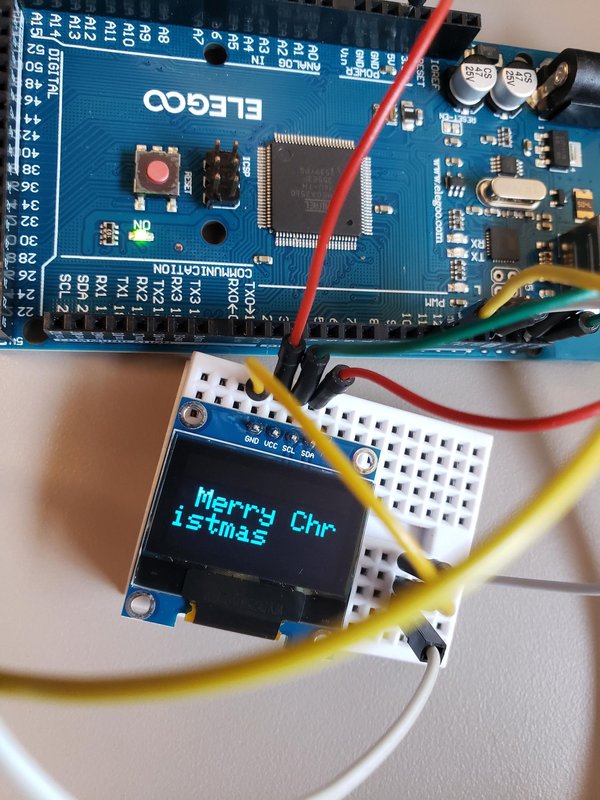
이 Instructables에서는 아두이노와 OLED, 피에조 부품을 활용해 크리스마스 노래를 재생하는 방법을 소개합니다. 이 내용이 이해하는 데 도움이 되기를 바랍니다. 감사합니다.
https://vimeo.com/manage/videos/1225413465
https://vimeo.com/manage/videos/1225412795
원문: https://www.instructables.com/OLED-With-Piezo-Playing-Christmas-Songs-With-Ardui/
 https://www.instructables.com/OLED-With-Piezo-Playing-Christmas-Songs-…